> ## Documentation Index
> Fetch the complete documentation index at: https://docs.drip.re/llms.txt
> Use this file to discover all available pages before exploring further.
# Overview
> Settings is where you can configure the bot to your server needs
## Accessing Settings
You can access Settings for your community by clicking the `⚙️ Settings` option in the `🛠┆admin` channel
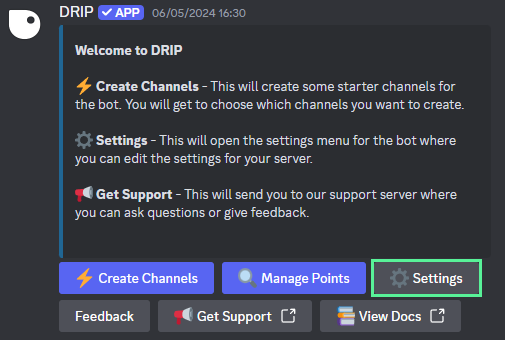 The following embed will appear:
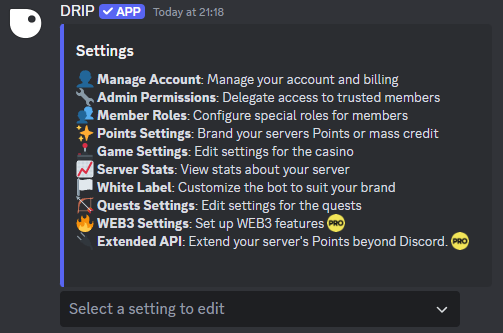 If you don't have an `🛠┆admin` channel yet, type [`/start`](/).
## Using the Settings
Drip Rewards has many settings to play with, all can used without having to leave Discord. Here is a small overview of the many features.
Brand your servers Points or mass credit
{" "}
View stats about your server
{" "}
Edit settings for the casino
{" "}
Edit the Quest settings for your community
{" "}
Delegate access to trusted members by setting up some roles
{" "}
Assign roles for member achievements
{" "}
Set up WEB3 features
{" "}
Customize the bot to suit your brand
Extend your server's Points beyond Discord
If you don't have an `🛠┆admin` channel yet, type [`/start`](/).
## Using the Settings
Drip Rewards has many settings to play with, all can used without having to leave Discord. Here is a small overview of the many features.
Brand your servers Points or mass credit
{" "}
View stats about your server
{" "}
Edit settings for the casino
{" "}
Edit the Quest settings for your community
{" "}
Delegate access to trusted members by setting up some roles
{" "}
Assign roles for member achievements
{" "}
Set up WEB3 features
{" "}
Customize the bot to suit your brand
Extend your server's Points beyond Discord