> ## Documentation Index
> Fetch the complete documentation index at: https://docs.drip.re/llms.txt
> Use this file to discover all available pages before exploring further.
# Tip
> Tip your fellow members with your Points
To use this command type `/tip user: name amount: 999 note: Note` in the message box where U**ser** is the user you want to tip, **Amount** is the number of Points you want to tip and **Note** is an optional message you want to add.
 Once you have entered the command, click enter and you will see the following message:
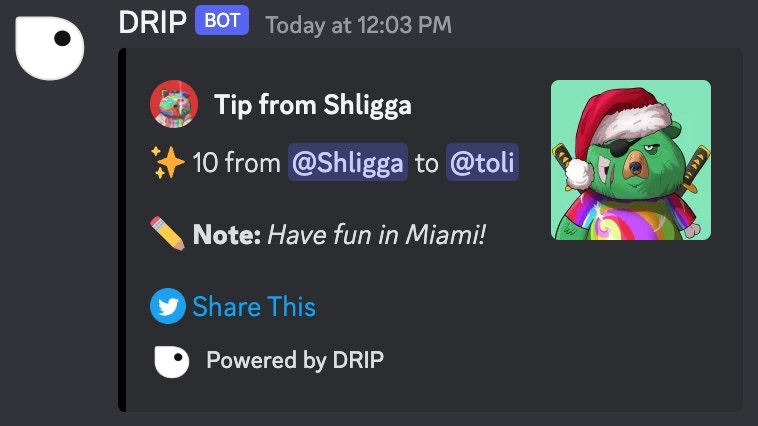
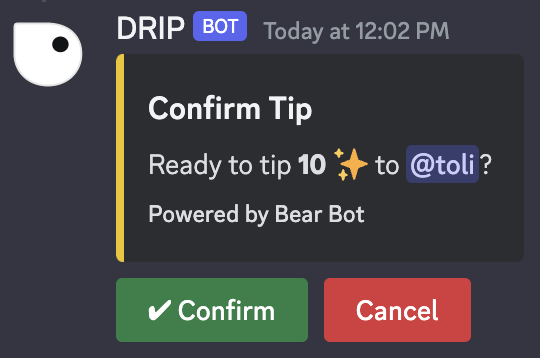 Click the `✔️ Confirm` button to confirm and send your tip. Now your tip will appear in the channel:
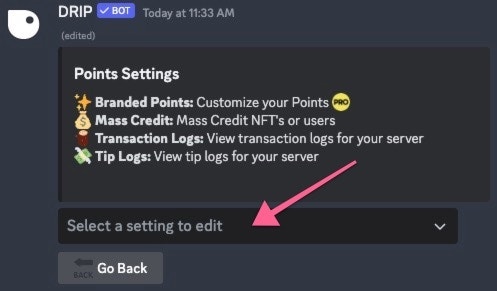
 Don't want all of your community member's tips being sent in random channels? Dedicate a specific channel for tips to be sent in when they are created! To do this, navigate to `Settings > Point settings` then click on `Tip Logs` from the dropdown menu
 Then select which channel you would like tips to be sent in from the dropdown menu or have Drip create one for you!
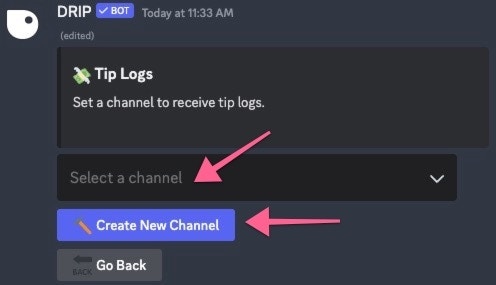 Now when members send a tip, the embed will be sent to a dedicated channel