> ## Documentation Index
> Fetch the complete documentation index at: https://docs.drip.re/llms.txt
> Use this file to discover all available pages before exploring further.

# Overview

> Create buyable items for your members to spend tokens on!

### Creating a Store Item

To create a Store Item, use the `/create` command and choose `📦 Store Item`.
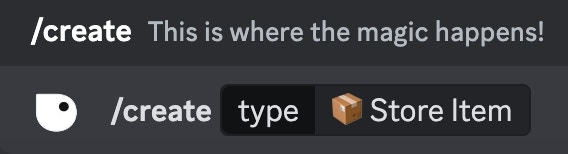
<Frame caption="Use the /create command">
  <img src="https://mintcdn.com/driprewards/Xh33JGW0jVY0ds3p/images/drip-features/img_e3b6f6.png?fit=max&auto=format&n=Xh33JGW0jVY0ds3p&q=85&s=8cf68daf6e0d9217253150064e658fde" width="568" height="154" data-path="images/drip-features/img_e3b6f6.png" />
</Frame>

After typing the command and clicking enter, the following embed will be sent to the channel
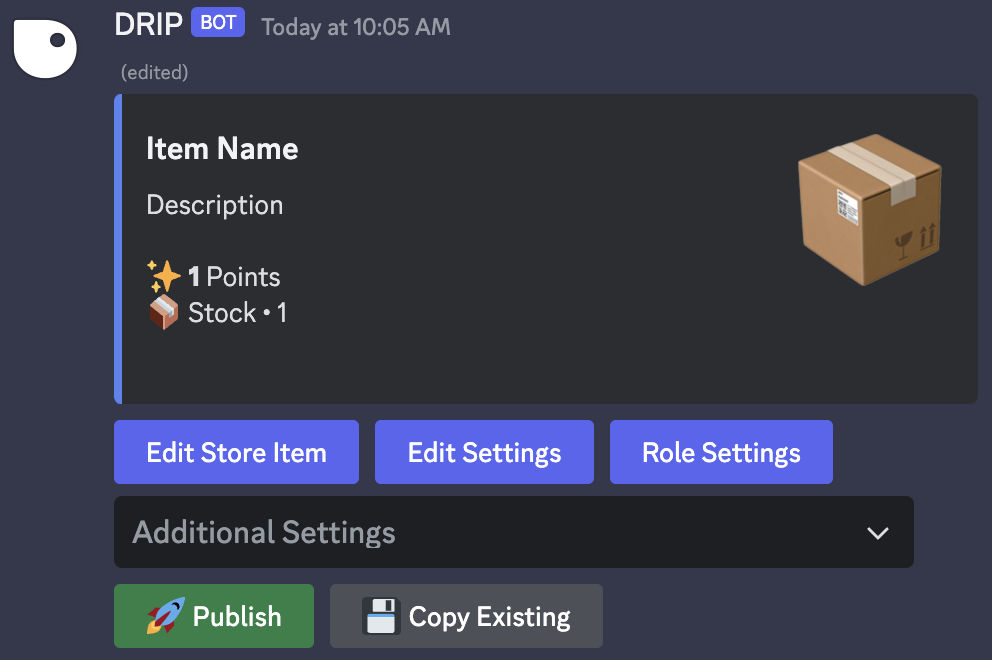
<Frame caption="Edit store embed">
  <img src="https://mintcdn.com/driprewards/Xh33JGW0jVY0ds3p/images/drip-features/img_85bb17.png?fit=max&auto=format&n=Xh33JGW0jVY0ds3p&q=85&s=efbaa8de8a03d040037c439d61a64e27" width="992" height="660" data-path="images/drip-features/img_85bb17.png" />
</Frame>

Choose the option you would like to edit by clicking one of the buttons or selecting from the dropdown menu

<Tabs>
  <Tab title="Edit Store Item">
    To edit a store item click on the `Edit Store Item` button

    <Frame caption="Click on Edit Store Item">
      <img src="https://docs.drip.re/~gitbook/image?url=https%3A%2F%2F2728597434-files.gitbook.io%2F%7E%2Ffiles%2Fv0%2Fb%2Fgitbook-x-prod.appspot.com%2Fo%2Fspaces%252FxUaE8LDXTeS85PkKxJJa%252Fuploads%252FtrElCbg3geMzaDRCoD87%252F%2523%25F0%259F%258F%25AA%25E2%2594%2586store%2520Drip%2520Documentation%2520-%2520Discord%25202024-01-26%2520at%252010.53.47%2520AM.jpg%3Falt%3Dmedia%26token%3D5e29308c-dece-4ce1-bd92-6612d3c29064&width=768&dpr=4&quality=100&sign=afe11d07&sv=1" />
    </Frame>

    A form will appear for you to edit the item name, description, thumbnail, and image displayed in the embed
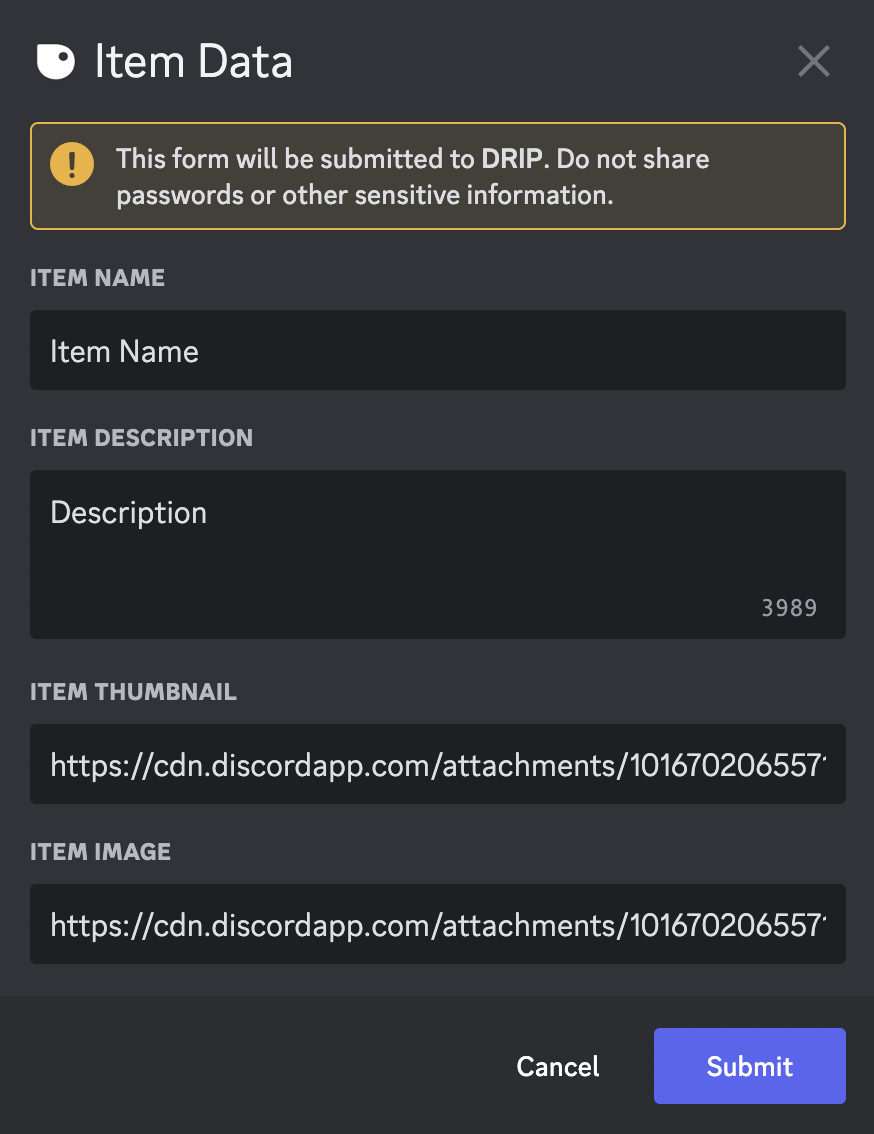
    <Frame caption="Edit Store Item">
      <img src="https://mintcdn.com/driprewards/Xh33JGW0jVY0ds3p/images/drip-features/img_f70b17.png?fit=max&auto=format&n=Xh33JGW0jVY0ds3p&q=85&s=4a045cb0a43aca3d2731e8a863bffa50" width="874" height="1134" data-path="images/drip-features/img_f70b17.png" />
    </Frame>
  </Tab>

  <Tab title="Edit Settings">
    To edit store item settings click on the `Edit Settings` button

    <Frame caption="Click on Edit Settings">
      <img src="https://docs.drip.re/~gitbook/image?url=https%3A%2F%2F2728597434-files.gitbook.io%2F%7E%2Ffiles%2Fv0%2Fb%2Fgitbook-x-prod.appspot.com%2Fo%2Fspaces%252FxUaE8LDXTeS85PkKxJJa%252Fuploads%252FtRcv1Sj1i8UYAmjFZmgj%252F%2523%25F0%259F%258F%25AA%25E2%2594%2586store%2520Drip%2520Documentation%2520-%2520Discord%25202024-01-26%2520at%252010.50.36%2520AM.jpg%3Falt%3Dmedia%26token%3Db18ed94f-a08e-4a23-acb2-88b7ebf851d6&width=768&dpr=4&quality=100&sign=f25c6d17&sv=1" />
    </Frame>

    A form will appear for you to edit the price, max per person, and stock of the item

    <Frame caption="Edit Settings">
      <img src="https://docs.drip.re/~gitbook/image?url=https%3A%2F%2F2728597434-files.gitbook.io%2F%7E%2Ffiles%2Fv0%2Fb%2Fgitbook-x-prod.appspot.com%2Fo%2Fspaces%252FxUaE8LDXTeS85PkKxJJa%252Fuploads%252F7uI4TXZY2q7sgFZ3j1UP%252F%2523%25F0%259F%258F%25AA%25E2%2594%2586store%2520Drip%2520Documentation%2520-%2520Discord%25202024-01-26%2520at%252010.56.57%2520AM.jpg%3Falt%3Dmedia%26token%3D49056d9e-b028-43c4-9a99-265281a9c248&width=768&dpr=4&quality=100&sign=99f7e1a6&sv=1" />
    </Frame>
  </Tab>

  <Tab title="Role Settings">
    To edit store item role settings click on the `Role Settings` button

    <Frame caption="Click on Role Settings">
      <img src="https://docs.drip.re/~gitbook/image?url=https%3A%2F%2F2728597434-files.gitbook.io%2F%7E%2Ffiles%2Fv0%2Fb%2Fgitbook-x-prod.appspot.com%2Fo%2Fspaces%252FxUaE8LDXTeS85PkKxJJa%252Fuploads%252FLKCWySyA1MSQkuOTdnld%252F%2523%25F0%259F%258F%25AA%25E2%2594%2586store%2520Drip%2520Documentation%2520-%2520Discord%25202024-01-26%2520at%252010.59.42%2520AM.jpg%3Falt%3Dmedia%26token%3D66c5b70b-ca44-4e8a-95ff-7644975c0e87&width=768&dpr=4&quality=100&sign=acfcb8f&sv=1" />
    </Frame>

    Use the 3 dropdown menus to choose the fitting roles to be rewarded, excluded, or required to purchase the item

    <Frame caption="Use the dropdown menus to select roles">
      <img src="https://docs.drip.re/~gitbook/image?url=https%3A%2F%2F2728597434-files.gitbook.io%2F%7E%2Ffiles%2Fv0%2Fb%2Fgitbook-x-prod.appspot.com%2Fo%2Fspaces%252FxUaE8LDXTeS85PkKxJJa%252Fuploads%252FMtnHcS7Vvli8kqN5TUYo%252F%2523%25F0%259F%258F%25AA%25E2%2594%2586store%2520Drip%2520Documentation%2520-%2520Discord%25202024-01-26%2520at%252011.02.37%2520AM.jpg%3Falt%3Dmedia%26token%3D7c956bac-4dd0-444f-91a3-865cbb422aec&width=768&dpr=4&quality=100&sign=864f3124&sv=1" />
    </Frame>
  </Tab>

  <Tab title="🧵 Create Thread on Purchase">
    Use the dropdown menu and select `🧵 Create Thread on Purchase` to edit whether a Thread is created when an item is purchased

    <Frame caption="Click on Create Thread on Purchase">
      <img src="https://docs.drip.re/~gitbook/image?url=https%3A%2F%2F2728597434-files.gitbook.io%2F%7E%2Ffiles%2Fv0%2Fb%2Fgitbook-x-prod.appspot.com%2Fo%2Fspaces%252FxUaE8LDXTeS85PkKxJJa%252Fuploads%252FkOcRMMtmb41CmUZtc9Ok%252F%2523%25F0%259F%258F%25AA%25E2%2594%2586store%2520Drip%2520Documentation%2520-%2520Discord%25202024-01-26%2520at%252011.05.36%2520AM.jpg%3Falt%3Dmedia%26token%3D4ea02c61-d561-4604-af4d-4a1c13c98980&width=768&dpr=4&quality=100&sign=cca7ce1d&sv=1" />
    </Frame>

    A green ✅ will appear next to the menu item when the feature is enabled

    <Frame caption="Enabled Thread on Purchase">
      <img src="https://docs.drip.re/~gitbook/image?url=https%3A%2F%2F2728597434-files.gitbook.io%2F%7E%2Ffiles%2Fv0%2Fb%2Fgitbook-x-prod.appspot.com%2Fo%2Fspaces%252FxUaE8LDXTeS85PkKxJJa%252Fuploads%252FtIUfm8RuIwuytrni4Cat%252F%2523%25F0%259F%258F%25AA%25E2%2594%2586store%2520Drip%2520Documentation%2520-%2520Discord%25202024-01-26%2520at%252011.08.06%2520AM.jpg%3Falt%3Dmedia%26token%3D1073549b-b9e8-4dd2-9499-a53ba4fc21c3&width=768&dpr=4&quality=100&sign=c88019cd&sv=1" />
    </Frame>
  </Tab>

  <Tab title="💰 Require Buyer Input">
    Use the dropdown menu and select `💰 Require Buyer Input` to require buyers to select a wallet or input custom text before purchasing an item
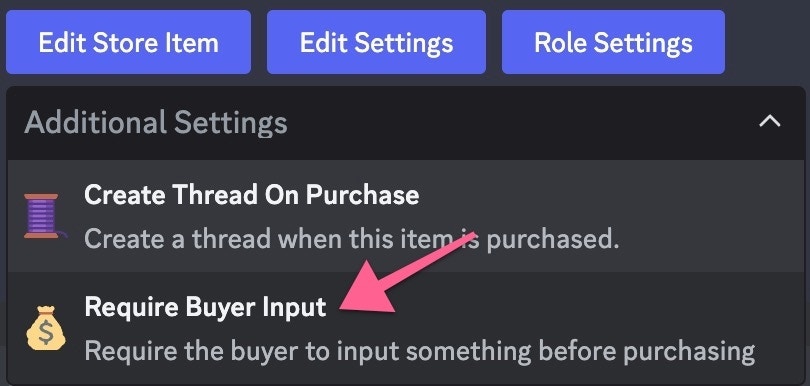
    <Frame caption="Click on Require Buyer Input">
      <img src="https://mintcdn.com/driprewards/Xh33JGW0jVY0ds3p/images/drip-features/img_fa2cab.jpg?fit=max&auto=format&n=Xh33JGW0jVY0ds3p&q=85&s=29cee1bc03a41bd4cd1b142877483c01" width="810" height="386" data-path="images/drip-features/img_fa2cab.jpg" />
    </Frame>

    Now you can select the type of input required of a user before they can purchase the store item. You can choose from the following options:

    * 💰 **Wallet:** Require the buyer to input their wallet before purchasing
    * 🔧 **Custom:** Require the buyer to input something custom before purchasing
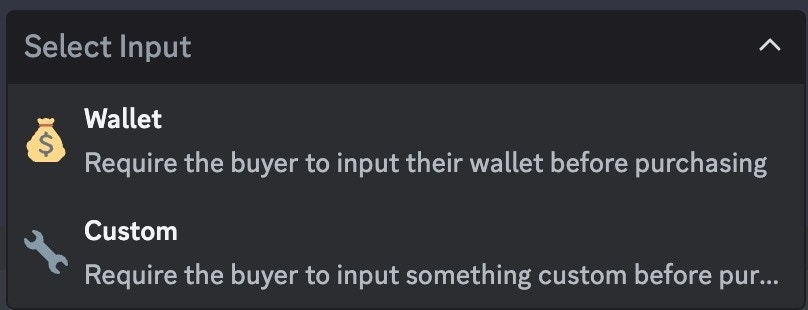
    <Frame caption="Select the type of input to require">
      <img src="https://mintcdn.com/driprewards/Xh33JGW0jVY0ds3p/images/drip-features/img_57fc1f.jpg?fit=max&auto=format&n=Xh33JGW0jVY0ds3p&q=85&s=d86c69f5b498e74be247093231a15499" width="808" height="310" data-path="images/drip-features/img_57fc1f.jpg" />
    </Frame>
  </Tab>
</Tabs>

To publish, click the green `🚀Publish` button. This will send your Store Item to the current channel

<Frame caption="Click the Publish button when finished">
  <img src="https://docs.drip.re/~gitbook/image?url=https%3A%2F%2F2728597434-files.gitbook.io%2F%7E%2Ffiles%2Fv0%2Fb%2Fgitbook-x-prod.appspot.com%2Fo%2Fspaces%252FxUaE8LDXTeS85PkKxJJa%252Fuploads%252FzJ0wGh91s6rEA2RYlcX3%252F%2523%25F0%259F%258F%25AA%25E2%2594%2586store%2520Drip%2520Documentation%2520-%2520Discord%25202024-01-26%2520at%252011.16.06%2520AM.jpg%3Falt%3Dmedia%26token%3D963a7c0c-aab3-4965-b966-2f91aee1b8f2&width=768&dpr=4&quality=100&sign=e27afd69&sv=1" />
</Frame>
